May 1, 2009

Iphone themes for Nokia 5800

Want your Nokia 5800 look like Iphone??
Like these???
Download the file and install it.
Your Iphone killer now looks like the prey!


Download Iphone Black by Dsma


Download Iphone Lush by Dsma

April 27, 2009

How to delete unwanted theme from Nokia 5800

Want to delete unwanted theme from your Nokia 5800??
There are 2 ways to do this!!
1.
Go to Menu - Settings - Application Manager - Installed Apps
There you will find theme files and all applications you have installed on your phone...
Select the unwanted theme and delete...easy huh?!

2.
If you don't find any theme you want to delete there from the application manager, just connect your phone on storage mode then go to memory card
Find folder called 'Private', if you don't see the folder then it must be hidden.
You have to go to folder option from your PC then find view option then select show all hidden data (mine is in German: Alle Dateien und Ordner anzeigen).
Double click the 'Private' folder then click import folder. There you will find all your installed theme.
Select the unwanted then delete!!

Voila...you won't find your unwanted theme on your phone anymore!!

But sometime (I dont know why) the theme file name is no longer there.All you will find is file name themepackage. If this happen then you wouldn't know which theme you want to delete. It's confusing somehow. You have to be careful in this or you will lose you lovely theme. If anybody knows any explanation about it just give me comment!


If once you find out that your favorite theme is somehow disappeared then don't get shocked.
I had this experience with my N73. I only can store around 18 themes on the phone. If you have installed more than 18 themes then the other installed theme will suddenly gone and you will not be able to install the same theme file again.
I don't know what to do with this...
But I think the best way is to check your themes numbers and delete unwanted theme before you install the new one unless you will lose your favorite theme!

April 25, 2009

Watching Movie on NOkia 5800

With wide screen on Nokia 5800...
What do you think about watching movie on it???


video by pinayearner

Convert your DVD with Zune Converter and play them on your tube!!
How about try these movies on....?

Fast and the Furious 4
Watchmen
Slumdog Millionaire
Batman The Dark Night
Twilight
Bolt

How to take better photos on the Nokia 5800 XpressMusic from allaboutsymbian.com

Hi I got this articles from allaboutsymbian.com
I hope it will help you to maximize the nokia 5800 camera result...
Happy reading....
For more details please visit www.allaboutsymbian.com

One of the interesting points brought out in my mention of the Nokia 5800 XpressMusic in my feature on phone camera apertures and sensor sizes was that the 5800's camera was distinctly under-sized compared to the likes of Nokia's awesome N95 and N82:

Noise/sensor testing

Quite a difference, but the presence of Carl Zeiss optics and the raw 3 megapixel resolution does leave some room for optimism. Yes, the camera on the 5800 XpressMusic isn't as good in all light conditions as the N82, for example, but as long as there's enough light then there's no reason not to still take some stunning photographs of your friends and the world around you.

Before I get into some 'How to' tips, here are some photo examples, as proof of what can be done, taken ad-hoc today as I wandered around in the UK winter sunshine. In each case, you can click through to see or download the full 5800-taken 3 megapixel photo if you like:
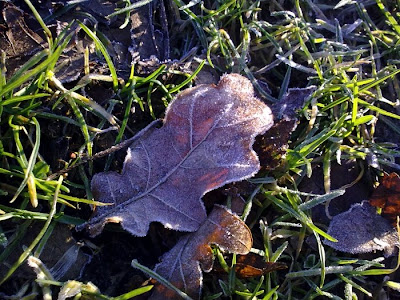
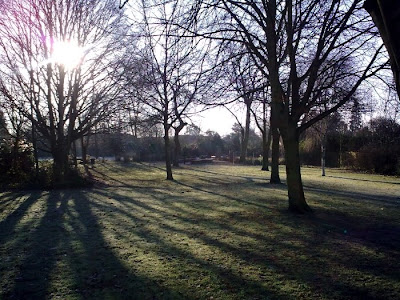
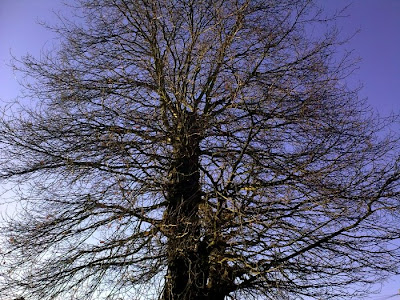
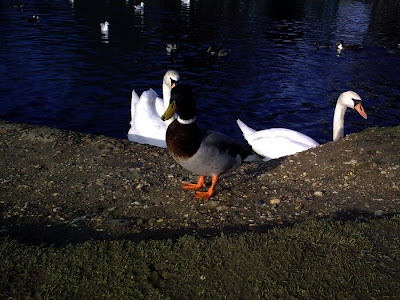


Hopefully the previous four photos, over a range of subjects, have convinced you that the 5800 XpressMusic's camera is not all bad!

And so taking photos on the device. As you might expect, my tips are largely as they'd be for any other camera-toting smartphone, with just a few tweaks:

* The easiest way to start the Camera application is to press and hold the camera shutter key. Because Camera is kept loaded in memory on the 5800, it should appear almost instantaneously, ready for action. (Note that if you haven't used your 5800 for a minute or so previously, you may need to flick the keylock switch first)

* Don't worry too much about dust on the camera lens, a brief wipe on a soft cloth is all that's needed to get rid of any finger grease - if you get too zealous about cleaning the glass, you'll end up with hundreds of micro-scratches. These won't affect photos too much , but they will look ugly.

* Don't worry about changing 'scene mode' or other settings, most of them don't make any difference. See here for detail on which ones are worth worrying about , if you have the time.

* As mentioned above, know that the 5800 XpressMusic's camera is on the small side, physically, so you'll need to have lots of light around to register on the small sensor. Sunlight is best, of course, but there are still wide variations in light levels on overcast days. Low light means potentially 'noisy' photos. And focussing won't be as accurate. Shooting snaps indoors will often produce disappointing results, but you may be able to help by hitting that big, thumb-friendly flash icon and setting flash to 'on'. This is called fill-in flash and for subjects a metre or so away in indistinct indoor lighting, can make a difference.

* The usual photo-taking tips apply, as with any camera phone: try to brace yourself when taking a photo, so that the device doesn't shake; wait a fraction of a second after the shutter sound before moving the phone down; think about the source of light and try to have it in the arc behind you if possible; for important static shots, take more than one, just in case - one may be sharper, better focussed or more shake-free.

* By default, geotagging of your photos is turned OFF. If you think you'll be wanting to place your photos on a map later on (e.g. on Flickr or Share on Ovi) then go into 'Options - Settings' and turn 'Show GPS info' on. As usual with GPS, be aware that getting a position fix may take a minute or so if you've moved a long way from the last time you used the phone's GPS. And it won't work indoors unless you're close to a big window and feely lucky... The geotagging algorithms do allow a certain time leeway, i.e. they'll accept a previous position fix provided it wasn't too long ago.

* Tapping on the envelope icon is the shortcut to use to fire your photo up to the world immediately - but that's another tutorial for another day!


[A video aside] When shooting video, light is even more important - at least when shooting stills, the camera has got time to open its electronic shutter for a decent length of time, e.g. 1/10 of a second, in order to gather enough light. With video, a new image has to be collected every 1/30th of a second, light or no light, resulting in much grainier/noisier low light video clips. The 5800's 'video light' doesn't really help much - it doesn't produce enough continuous illumination and has the unfortunate side effect of making your subjects squint into the (to them) dazzling light. Bottom line: don't even think about shooting video in low light situations with the 5800 XpressMusic.

Steve Litchfield, All About Symbian, 12 Feb 2009

Thanks for sharing Steve

April 24, 2009

How to change Fonts on Nokia 5800

WANT TO HAVE DIFFERENT FONTS LIKE THESE ON YOUR NOKIA 5800???
KEEP READING.....


There are 2 ways to do this...
First you have to check your phone firmware (software version)
Just type *#0000# on your Nokia device's keypad
On the screen you will see the software version of your Nokia phone
When you finished, please select one of two ways below
Just a quick reminder though, when you change your font on your phone it also affects the font displayed on your web browser. So you might want to choose a suitable font to go with your phone.
For this tutorial I use my favorite font KleinSlabSerif.ttf

For Nokia 5800 - v11 firmware


1.
Browse any fonts you like, you can download it from the internet or you may pick up from your PC. If you want to take font from your PC just Go to Start right click Explore. Choose Program (C:) WINDOWS. Find fonts folder then choose which one you like to install on your phone. I know that you don't find copy options from your right click. Then just drag the font into any folder you like. Go to the folder you dragged your font and create another folder. Name the folder ‘Fonts’. Then you have to make 3 copy of the font file.Done??Now you have 4 fonts in the folder, correct???
Now rename the fonts into

o s60snr.ttf
o s60ssb.ttf
o s60tsb.ttf
o S60ZDIGI.ttf

They should be exactly like that…mind the uppercase and the lowercase!

2.
Now connect your phone using the mass storage. Or you can use the card reader to access your memory card. Then browse your memory card and find the folder called ‘Resource’. Got it???I bet you have!

3.
Now go to the PC again. Copy the ‘Fonts’ folder you just created then go again to ‘Resource’ folder on your memory card. Paste it there. Done??Good.

4.
Now eject the USB cable and restart your phone! Voila...Now your phone fonts have changed!


For Nokia 5800 - v20 firmware

1.
Browse any fonts you like, you can download it from the internet or you may pick up from your PC. If you want to take font from your PC just Go to Start right click Explore. Choose Programme (C:) WINDOWS. Find fonts folder then choose which one you like to install on your phone. I know that you dont find copy options from your right click. Then just drag the font into any folder you like. Go to the folder you dragged your font and create another folder. Name the folder ‘Fonts’. Then you have to make 3 copy of the font file.Done??Now you have 4 fonts in the folder, correct???
Now rename the fonts into

•s60sc_c.ttf
•s60tchk_c.ttf
•S60ZDIGI.ttf

They should be exactly like that…mind the uppercase and the lowercase!

2.
Now connect your phone using the mass storage. Or you can use the card reader to access your memory card. Then browse your memory card and find the folder called ‘Resource’. Got it???I bet you have!

3.
Now go to the PC again. Copy the ‘Fonts’ folder you just created then go again to ‘Resource’ folder on your memory card. Paste it there. Done??Good.

4.
Now eject the USB cable and restart your phone! Voila...Now your phone fonts have changed!

If you want to revert back to the original fonts, just browse the meory card. Delete the 'Fonts' folder you created in the 'Resource' folder. Restart your phone and the original fonts is back!!


Enjoy!

SMS Shake Nokia 5800

Boring to receive sms in a usual way...
With nokia 5800 (and other phones support accelerometer),(it works on N95, N97, N85 also)
YOU JUST NEED TO SHAKE YOUR PHONE TO READ SMS


Normally without ShakeSMS: You need to unlock the phone first, then read the message, after replying, lock the phone again.

With ShakeSMS: Just shake your phone, you can read the sms;
1. Action —— How to remember
2. Lean Left — Leave (delete) SMS
3. Lean Right — Write (Reply SMS)
4. Lean Up — Up to the SMS Folder In
5. Lean Down — Done (Back to Previous Screen and Lock keypad)

Action ------ How to remember
Lean Left -- Leave (delete) SMS
Lean Right -- Write (Reply SMS)
Lean Up -- Up to the SMS Folder In
Lean Down -- Done (Back to Previous Screen and Lock keypad

Download the software here
The bad thing is this software is unsigned.So you have to sign it first before you can use it...;)

April 22, 2009

Nokia 5800 camera review

Nokia 5800 has 3.2 MP camera, just like the nokia N73.
When I wanted to buy this phone I thought that the camera result will be at least similar to that on N73.I was actually expecting it better.
Although the tube camera has dual flashlight, the camera result is not that good!
Now I miss my N73, really!


This picture I took with my N73 in a room with automatic setting and fluorescent white balance. I haven't made any editing on this picture.
compare to:


I took this picture with nokia 5800..in room with enough light, the result of the nokia 5800 camera looks the same to N73 camera but if you see it clearly from the phone the picture looks rough..


These two pictures I took in daylight with nokia 5800. The picture looks blured and not clear. Dotted everywhere. Very rough


I took this picture with N73 camera. The color looks fine with 3.2 MP
With low light the pictures looks somehow greenish...


Overall, I'm not too satisfied with Nokia 5800 camera result. Maybe I expected so much!