Showing posts with label S60V5 applications. Show all posts

October 2, 2009

Magic 8-ball by wolftongren


The Magic 8-Ball, running as a widget on mobile phone,originally is a toy used for fortune-telling or seeking advice.

How To Use:

1, Ask the Magic 8-ball a yes-or-no question
2, Touch on the Magic 8-Ball or press "enter"
3, The Magic 8-Ball will give you an advice

Supported Phones: Nokia N97, 5800

Download it here

October 1, 2009

Pocket Percussion

Pocket Shaker Lite turns your phone into a percussion instrument.


Download it here

Nokia Braille Reader v1.0 For Nokia s60v5


The application has been developed in a joint project between Nokia, Tampere University and the Finnish Federation of the Visually Impaired.
Compatibility and system requirements

Compatible with Nokia devices based on S60 5th Edition, including Nokia N97 and Nokia 5800 XpressMusic and the newly released N97 mini, 5530, 5230 and X6.
User instructions
Starting the application

Open the Nokia Braille Application by pressing the phones menu key and selecting applications. Find the braille application icon, touch it to start the application.

Tip: you can have the braille application included into the quick access bar in the phone home screen.

Once the application starts you can hide it by pressing the hide key at the bottom left of the key board. The application then runs in the background
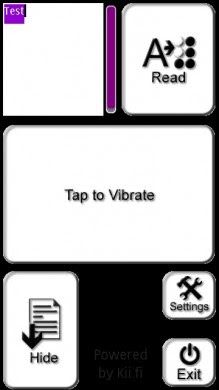
The main menu of the Nokia Braille Reader

The main screen of the application is split into three areas, top, middle and bottom.

The top area has two function areas in it. The left one contains the text to be read. This is usually the text message, but clicking the area opens a text editor for free text input. The top right area is the area to press to start reading the text.

The middle area of the main screen is a test area that can be used to verify the application actually is running. Touching it will give two short buzzes of the vibra motor to indicate the application is actually running.

The bottom area of the main screen contains three function keys. The left bottom corner has a area that hides the application into back ground processing mode. In the middle section of the bottom area there is a non functional area. In the bottom right corner there is a small exit key to close the application and right above that key there is a settings key that opens the set-up menu of the application.
Reading a text message

When a text message arrives, Nokia Braille Reader automatically open its main view. The text message is located into a text box on the top left of the screen. To read it, press the upper right hand corner of the device. The application gives a short buzz to acknowledge moving into text reading mode. To read, press down with a finger anywhere on the screen, except for the back to menu area at the very bottom center of the display. Once the first character is read the reading pauses. Lift your finger briefly and press it back down to proceed reading the next character. If you lift your finger off the screen in the middle of reading the character the reading pauses and continues when you repalce your finger. You can also use the volume control keys on the side of the device to move forward and back between the characters. There is an empty character between words. At the end of the message lifting your finger and pressing it back down will give a long buzz. To go back to the main menu press the back to menu area at the very bottom center of the screen.
How the SW reads braille

The Vibrating motor in the phone reads the Braille character out dot by dot, you feel a sharp pulse when a raised dot is present and a soft one when the dot is not raised. There is a pause between letters and a longer one between words, a longer buzz indicates the end of the message. The speed of reading and the lengths of the pauses can be controlled from the settings menu. The setting access area is in the main menu at the bottom right just above the exit key.

Download it here

Midomi Music Search & ID


Have ever experienced listening music on the radio or somewhere and you love the song BUT you dont know what is the tittle nor the singer of the song???
Then this app is the one for you...
Midomi is the fastest way to find and explore music.
This application is similar to Track ID application on Sony Ericsson Phones. I find it very useful for those who are crazy about music!!

Download it here

XpressEXIF – Photo application For Nokia 5800XM, N97


Want to prove to someone that picture girl, whom he, in his words made an hour ago, actually downloaded from the Internet or look under what conditions was made by one or another snapshot :-)

JPG files are known to sometimes contain many interesting details about the shooting, such as camera model, the exact date and time the file was created, various shooting parameters. The program allows you to view data such as:
# Camera model
# The original date and time the picture was
# ISO Sensitivity
# ExposureTime
# Focal length
# The magnitude of the diaphragm
# Using the flash
# Mode, in which the photograph was taken

To make pictures and thumbs were seen in the program requires that the photo at least once it was opened in a standard gallery.

Download it here

Smartphoneware Best Spam Killer v1.00 For Nokia 5800XM, N97 Signed


Best Spam Killer is the way to eliminate SMS spam effectively and to avoid SMS from unwanted persons. Spam Killer is SMS firewall that kills spam and junk messages before they reach your inbox thus filtered messages do not disturb you.

Download it here

September 2, 2009

Metal Calc


MetalCalc2 is a freeware flash lite calculator for Symbian S60 5th Edition (like Nokia 5800, N97 and the 5530). The application supports both portrait and landscape view.

Download it here

GDesk - Omnia Design


The Omnia looks like gdesk application
If you have tried the iDesk you must have known about this applications. This one is created by A.R.A.
First Download the GDesk software and its all plugins.
Then copy the .gdd design to your memory card.
Open GDesk(Touch Everywhere)choose DESIGN>> LOAD DESIGN and select the .gdd file from your memory card.

Download GDesk SOftware here

Download .gdd file here

Converter Application for Nokia 5800


The Converter Touch application for the Nokia 5800, N97 and 5530 is a converter that converts many different units such as lengths, volumes, speed etc. This app is in my opinion another “must have” application for the S60v5 phones.

Download it here

Converter Application for Nokia 5800


This one is 'must have' application for nokia 5800.This application can converts many different unit such as length, speed, volume, etc. It is also applicable for nokia N 97 and Nokia 5530...

Download it here

August 31, 2009

Battery Level Widget


This Application shows you the battery level of your fone and estimated used time remaining..

Download widget fo nokia 5800 here
Download widget for nokia N97 here

Shotgun Application for Nokia 5800

The ShotGun application is an accelerometer-based shotgun app for s60v5 devices, like the Nokia 5800 XM, Nokia 5530 and the Nokia N97


Download Shotgun App here

August 19, 2009

Clock Screensaver (Key Lock Clock) Updated To v0.60


Key Lock Clock is a free Clock application that is shown while the device’s key lock is on. The idea was inspired by the feature found from E71 & E66.

Download Clock Screensaver here

Sweet Memories Game


Sweet Memories is a memory game for Nokia touch screen phone ( Nokia 5800, N97 and 5530). In other words you have to find all pairs of same pictures. Works on touch screen devices with fingers and non-touch devices with keypad.

Download Sweet Memories Game here

Shake it Game


Shake it for the Nokia 5530, 5800 and N97 is a fun game that you have to shake your phone as fast as you can until the can pops up.


Download Shake it Game here

August 11, 2009

Google Translate Widget

Thanks God I found this applications..


I always have questions in my head how a word said in other language.That's why I like to have Dictionary in my phone..But I only have English to English Dictionary..:(
Now with this application I can translate any word in any language to any other language ONLINE...
NOw I want to share this application with those who have the same feeling as I do :)

Download the widget here

Theme Launcher

Do you have so many themes on your phone??
For those who likes to change themes a lot then this application is very helpful.
It creates shortcut that go directly to theme list..so you dont have to go to setting - personalise- themes etc..


All credits to Neuvex for creating this application ..thx..

Download theme Launcher here

July 28, 2009

Bright Light Touch 1.0 (Use 5800 Flash as Torch)

When the lights went off then what is the first thing you're looking for???
TORCH..rite??
What if you dont have it?But you have nokia 5800? :P
YOu should not be worried now...

Light up your device, you can use it as a torch! Turn on the camera flash by sliding the on-screen switch.


Get brightlight here

July 18, 2009

Xpress Cut for Nokia 5800


Get Xpress Cut here

To run this application you need python (1.9.4 or above)..Get it here

Choose folder 'Sound' to find the mp3 files you want to cut. The cut files are saved in the same folder , 'Sound' folder.

Happy Cutting !

July 14, 2009

Calc Touch v 1.0


This is a calculator application for touch devices


Get Calc Touch 1.0 here