Showing posts with label tips and trick. Show all posts

July 21, 2009

To take better picture with nokia 5800

What makes Nokia 5800 camera quality is the phone back cover...it was made of plastic, it cover the camera lens and reduce the quality of the image taken!
Try to remove the back cover and see the result below...see the difference on the lower part of the rack!


with back cover


without back cover

But removing the back camera seems to be ineffective ways..Now try this one:
take picture with all normal (default) setting but please +1 contrast..you will see the result as below!


+1 contrast


Default Setting


+1 contrast


Default Setting

Now Try and see it your self!

June 8, 2009

Install UNSIGNED applications by hacking your nokia 5800

I bet you are very happy when found so many COOL applications for your beloved nokia 5800, but your face will be :( when you found out that the applications said to be UNSIGNED!!!
Now I want to share to you the tutorial video made by Downin from dailymobile.se (thanks to him)in how to hack your nokia 5800 so that you can install any unsigned applications to your nokia 5800!

USE THIS GUIDE AT YOUR OWN RISK. IF NOT FOLLOWED PROPERLY OR ANOTHER APPLICATION INTERFERES IT MAY DAMAGE YOUR MOBILE PHONE. ("DAILYMOBILE") AND/OR ("N5800XM/DOWNIN")AND I DO NOT ACCEPT RESPONSIBILITY FOR ANY DAMAGE CAUSED TO YOUR PHONE


Follow the step by step on this video..
It is very easy and understandable...I have tried it and it worked!!
But first download the files needed for this process below
Hack Files needed
Go to www.opda.net.cn and register!
The registration form will look like this!


Then go to the link shown in the video and you will need to insert your IMEI NUmber in the upper box and the last 9 digits of your telephone number and add 13 before!
so if your phone number is for example +62 123 456789123 then insert 13456789123.
The boxes look like this


(thx nasua for the images)

Then you will need to wait about 24 hour to get the certificate and key file!

Then follow the tutorial on these 2 videos!They tell you all how!
Please turn the speaker louder on the second video because the sound quality is not very good!!
Enjoy!!

ps: PM me if you need something to ask..If I can I will explain!


April 27, 2009

How to delete unwanted theme from Nokia 5800

Want to delete unwanted theme from your Nokia 5800??
There are 2 ways to do this!!
1.
Go to Menu - Settings - Application Manager - Installed Apps
There you will find theme files and all applications you have installed on your phone...
Select the unwanted theme and delete...easy huh?!

2.
If you don't find any theme you want to delete there from the application manager, just connect your phone on storage mode then go to memory card
Find folder called 'Private', if you don't see the folder then it must be hidden.
You have to go to folder option from your PC then find view option then select show all hidden data (mine is in German: Alle Dateien und Ordner anzeigen).
Double click the 'Private' folder then click import folder. There you will find all your installed theme.
Select the unwanted then delete!!

Voila...you won't find your unwanted theme on your phone anymore!!

But sometime (I dont know why) the theme file name is no longer there.All you will find is file name themepackage. If this happen then you wouldn't know which theme you want to delete. It's confusing somehow. You have to be careful in this or you will lose you lovely theme. If anybody knows any explanation about it just give me comment!


If once you find out that your favorite theme is somehow disappeared then don't get shocked.
I had this experience with my N73. I only can store around 18 themes on the phone. If you have installed more than 18 themes then the other installed theme will suddenly gone and you will not be able to install the same theme file again.
I don't know what to do with this...
But I think the best way is to check your themes numbers and delete unwanted theme before you install the new one unless you will lose your favorite theme!

April 24, 2009

How to change Fonts on Nokia 5800

WANT TO HAVE DIFFERENT FONTS LIKE THESE ON YOUR NOKIA 5800???
KEEP READING.....
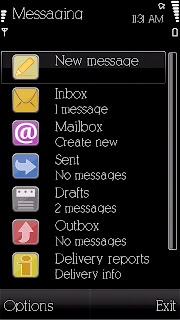
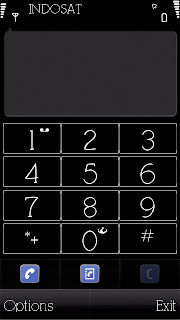
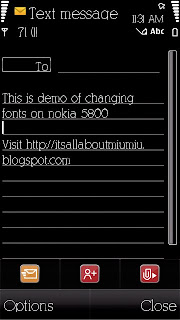


There are 2 ways to do this...
First you have to check your phone firmware (software version)
Just type *#0000# on your Nokia device's keypad
On the screen you will see the software version of your Nokia phone
When you finished, please select one of two ways below
Just a quick reminder though, when you change your font on your phone it also affects the font displayed on your web browser. So you might want to choose a suitable font to go with your phone.
For this tutorial I use my favorite font KleinSlabSerif.ttf

For Nokia 5800 - v11 firmware


1.
Browse any fonts you like, you can download it from the internet or you may pick up from your PC. If you want to take font from your PC just Go to Start right click Explore. Choose Program (C:) WINDOWS. Find fonts folder then choose which one you like to install on your phone. I know that you don't find copy options from your right click. Then just drag the font into any folder you like. Go to the folder you dragged your font and create another folder. Name the folder ‘Fonts’. Then you have to make 3 copy of the font file.Done??Now you have 4 fonts in the folder, correct???
Now rename the fonts into

o s60snr.ttf
o s60ssb.ttf
o s60tsb.ttf
o S60ZDIGI.ttf

They should be exactly like that…mind the uppercase and the lowercase!

2.
Now connect your phone using the mass storage. Or you can use the card reader to access your memory card. Then browse your memory card and find the folder called ‘Resource’. Got it???I bet you have!

3.
Now go to the PC again. Copy the ‘Fonts’ folder you just created then go again to ‘Resource’ folder on your memory card. Paste it there. Done??Good.

4.
Now eject the USB cable and restart your phone! Voila...Now your phone fonts have changed!


For Nokia 5800 - v20 firmware

1.
Browse any fonts you like, you can download it from the internet or you may pick up from your PC. If you want to take font from your PC just Go to Start right click Explore. Choose Programme (C:) WINDOWS. Find fonts folder then choose which one you like to install on your phone. I know that you dont find copy options from your right click. Then just drag the font into any folder you like. Go to the folder you dragged your font and create another folder. Name the folder ‘Fonts’. Then you have to make 3 copy of the font file.Done??Now you have 4 fonts in the folder, correct???
Now rename the fonts into

•s60sc_c.ttf
•s60tchk_c.ttf
•S60ZDIGI.ttf

They should be exactly like that…mind the uppercase and the lowercase!

2.
Now connect your phone using the mass storage. Or you can use the card reader to access your memory card. Then browse your memory card and find the folder called ‘Resource’. Got it???I bet you have!

3.
Now go to the PC again. Copy the ‘Fonts’ folder you just created then go again to ‘Resource’ folder on your memory card. Paste it there. Done??Good.

4.
Now eject the USB cable and restart your phone! Voila...Now your phone fonts have changed!

If you want to revert back to the original fonts, just browse the meory card. Delete the 'Fonts' folder you created in the 'Resource' folder. Restart your phone and the original fonts is back!!


Enjoy!

April 22, 2009

Nokia 5800 camera review

Nokia 5800 has 3.2 MP camera, just like the nokia N73.
When I wanted to buy this phone I thought that the camera result will be at least similar to that on N73.I was actually expecting it better.
Although the tube camera has dual flashlight, the camera result is not that good!
Now I miss my N73, really!


This picture I took with my N73 in a room with automatic setting and fluorescent white balance. I haven't made any editing on this picture.
compare to:


I took this picture with nokia 5800..in room with enough light, the result of the nokia 5800 camera looks the same to N73 camera but if you see it clearly from the phone the picture looks rough..


These two pictures I took in daylight with nokia 5800. The picture looks blured and not clear. Dotted everywhere. Very rough


I took this picture with N73 camera. The color looks fine with 3.2 MP
With low light the pictures looks somehow greenish...


Overall, I'm not too satisfied with Nokia 5800 camera result. Maybe I expected so much!

April 16, 2009

Problems encountered on Nokia 5800


I already had problem with my New Nokia 5800 after I bought this phone for 3 days!!
What an annoying thing!
The first problem I encountered was that the phone was restarted it self every time I went to the Gallery...It also happened when I went open Gallery again to send MMS message.Then when I was playing the music from the music gallery I couldn't turn up or turn down the volume! I couldn't even deleted any songs from there!!It said General error!But when I went to the memory card and played the music there I could turn up and turn down the volume. I could delete song files from there too. But the deleted files still remained on the music gallery. And I couldn't play it either.I didn't know what was wrong with this phone!
It was driving me mad. Well...I still have the warranty though but I didn't want to return it and found out that my phone is already broken!
No way! Because I love this phone..Never want any phone like this one...
Then I restarted the phone and it was getting worse.I couldn't use any internet connection from my phone!
Then I intended to upgrade my phone firmware (from Nokia official site), but when I checked it, it was already updated (V20)
Then it said that I could even reinstall the firmware again if I wished. And I did that unless my phone wouldn't work anymore..
Then I downloaded the software and followed all instructions...but every time I came to the last part of the re installation it was stucked. The phone is off and was disconnected from the PC.It happened many times.Although the screen said that it was normal for the phone to get disconnected during the process but it was different.I waited 15 minutes for the process to complete, but no success. I tried again another 15 minutes and again and again.But none of them were succeed!
I was crazy about that!Then I thought that bringing the phone to Nokia care would be the best way.
I couldn't even sleep all night. I tried to figure out what was wrong with my phone.
I was thinking the the software of this phone made this phone didn't work properly. i didn't think of anything else.
Then my boyfriend asked me to take out the memory card from the phone!
Di you know what happened??
The phone went back to normal again.I tried to send 1 music files to the phone and played it and test the volume and everything worked normally. nothing wrong with the phone without the memory card. So I assumed that the problem was in the memory card. I didn't know whether it broken or anything. Then I decided to reformat the memory card. Of course I lost all my data there because I didn'd back it up. But it didn't matter. I had them all on my PC.
After reformating the card, I put it inside again and send some data and tired them all, and it was like a miracele to find out that it seemed that nothing happened to the phone. The phone is like a brand new phone again!
And I hope that it will stay well forever...
Fiuh...what a nightmare!